Introduzione
Il server LDAP incluso nella serie di centralini UCM di Grandstream consente di creare una rubrica condivisa tra più telefoni VoIP – anche di terze parti – a patto che supportino la funzionalità LDAP Phonebook
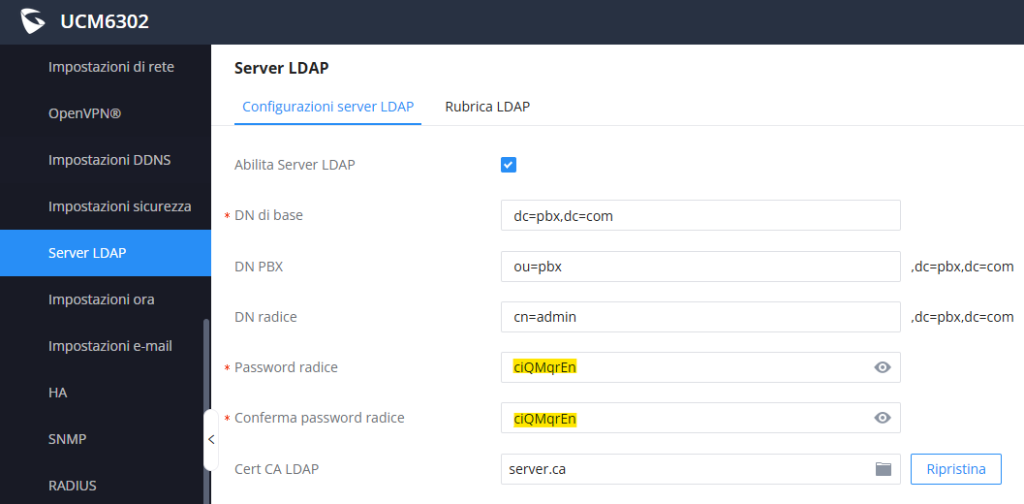
In questo articolo si vede come configurare alcuni dei più diffusi marchi di telefonia IP con la rubrica emessa dal server LDAP Grandstream, presupponendo che essa sia configurata come da screenshot che segue, ovvero a default (ad eccezione della password che è generalmente randomica e va quindi annotata):
Configurazione su telefoni Grandstream
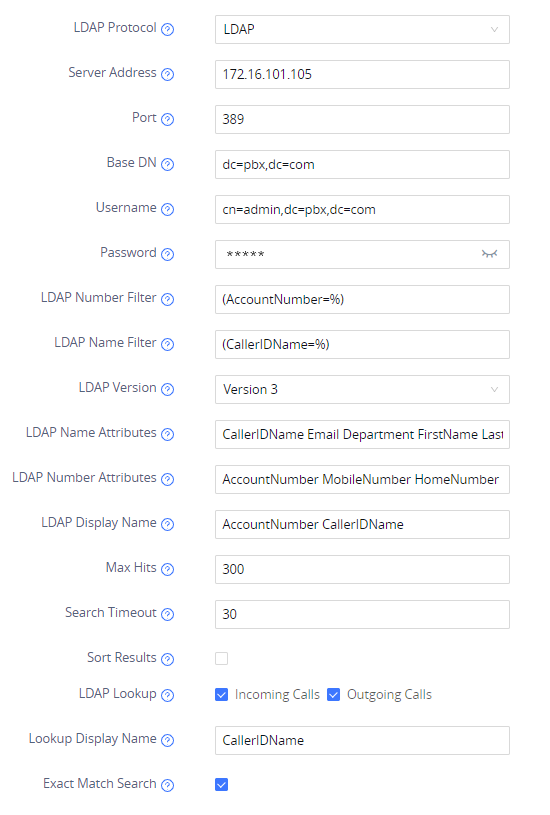
Percorso di configurazione
Interfaccia web > Application > LDAP
LDAP Protocol LDAP
Server Address Indirizzo IP del UCM
Port 389
Base DN dc=pbx,dc=com
Username cn=admin,dc=pbx,dc=com
Password Inserire quella precedentemente annotata
LDAP Number Filter (AccountNumber=%)
LDAP Name Filter (CallerIDName=%)
LDAP Version Version 3
LDAP Name Attribute CallerIDName FirstName LastName
LDAP Number Attribute AccountNumber MobileNumber HomeNumber
LDAP Display Name AccountNumber CallerIDName
Max Hits 300
Search Timeout 30
LDAP Lookup √ Incoming Calls √ Outgoing Calls
Lookup Display Name CallerIDName
Exact Match Search √
Configurazione su DECT Grandstream
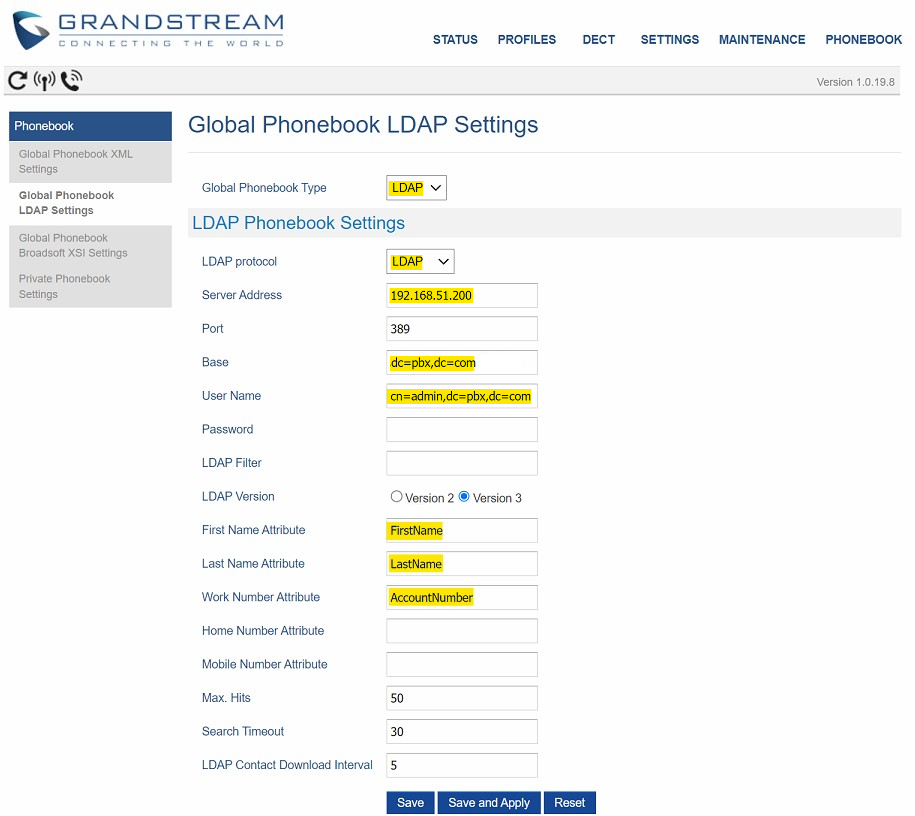
Percorso di configurazione
Interfaccia web > Phonebook > Global Phonebook LDAP Settings
Global Phonebook Type LDAP
LDAP Protocol LDAP
Server Address Indirizzo IP del UCM
Port 389
Base DN dc=pbx,dc=com
Username cn=admin,dc=pbx,dc=com
Password Inserire quella precedentemente annotata
First Name Attribute FirstName
Last Name Attribute LastName
Work Number Attribute AccountNumber
Configurazione su telefoni Yealink
Percorso di configurazione
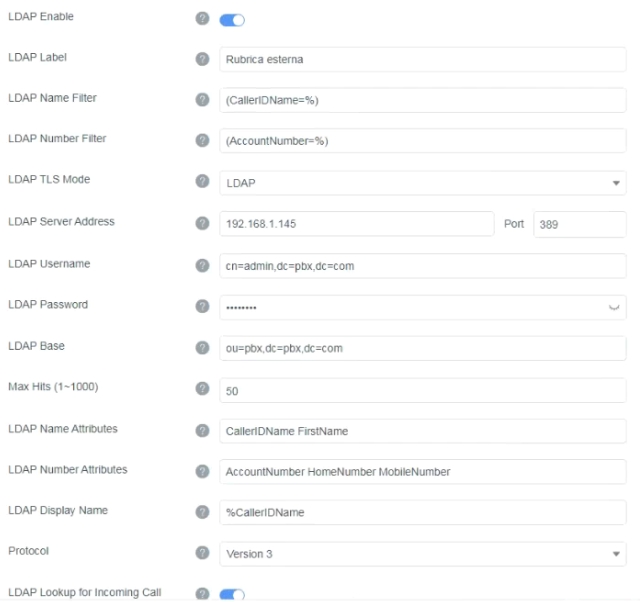
Interfaccia web > Directory > LDAP
LDAP Enable Yes
LDAP Label Rubrica esterna
LDAP Name Filter (CallerIDName=%)
LDAP Number Filter (AccountNumber=%)
LDAP TLS Mode LDAP
LDAP Server Address Indirizzo IP del UCM
Port 389
LDAP Username cn=admin,dc=pbx,dc=com
LDAP Password Inserire quella precedentemente annotata
LDAP Base dc=pbx,dc=com
Max Hits (1-1000) 50
LDAP Name Attribute CallerIDName FirstName LastName
LDAP Number Attributes AccountNumber HomeNumber MobileNumber
Lookup Display Name %CallerIDName
LDAP Protocol Version 3
LDAP Lookup for Incoming Call Yes
Configurazione su telefoni Snom
Percorso di configurazione
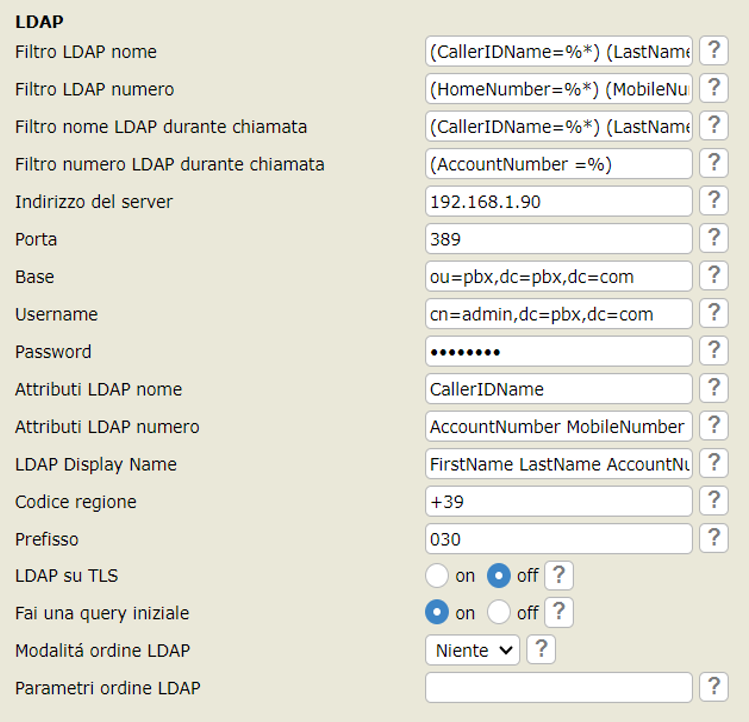
Interfaccia web > Avanzate > Rete > LDAP
Filtro LDAP nome (CallerIDName=%*) (LastName=%*) (FirstName=%*)
Filtro LDAP numero (HomeNumber=%*) (MobileNumber=%*)
Filtro nome LDAP durante chiamata (CallerIDName=%*) (LastName=%*) (FirstName=%*)
Filtro numero LDAP durante chiamata (AccountNumber =%)
Indirizzo del server Indirizzo IP del UCM
Porta 389
Base ou=pbx,dc=pbx,dc=com
Username cn=admin,dc=pbx,dc=com
Password Inserire quella precedentemente annotata
Attributi LDAP nome CallerIDName
Attributi LDAP numero AccountNumber MobileNumber HomeNumber Fax
LDAP Display Name FirstName LastName AccountNumber CallerIDName
Configurazione su telefoni Gigaset