
La serie di gateway ed SBC SmartNode di Patton può – a seconda del modello – eseguire due diversi OS: Trinity (più recente e in costante aggiornamento) e SmartWare (datato e non più aggiornato).
Differenze in pagina web
Una grande differenza che fornisce riscontro immediato sul sistema su cui si sta operando, è la pagina web del dispositivo: Trinity presenta una GUI moderna ed ottimizzata per schermi panoramici con una struttura di menù nidificata, mentre SmartWare presenta differenti pagine di HTML semplice con elementi essenziali e struttura di menù in cascata

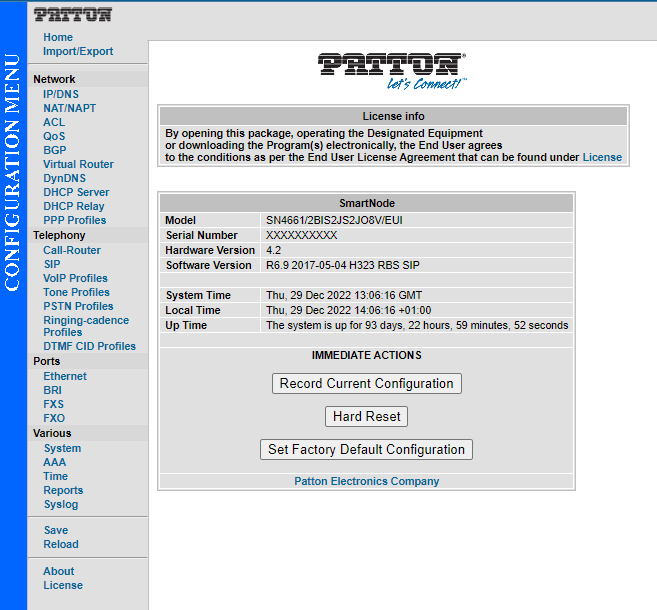
Differenze in configurazione
SmartWare presenta differenze sostanziali che rendono incompatibili gli script di configurazione ideati per questa piattaforma con i prodotti basati su Trinity.
Di seguito sono riportate alcune differenze a titolo esemplificativo
Nomi dei contesti e dei profili di DEFAULT solitamente definiti in minuscolo
SMARTWARE
profile tone-set default
context cs switch

TRINITY
profile tone-set DEFAULT
context cs SWITCH
Il binding dell’interfaccia di trasporto non viene fatto su ipaddress ma direttamente sulla ip interface
SMARTWARE
context sip-gateway GW_5060
	interface IF_GW_5060
	bind interface WAN context router port 5060

TRINITY
context sip-gateway GW_5060
	interface IF_GW_5060
		transport-protocol udp+tcp 5060
		no transport-protocol tls
		bind ipaddress ROUTER WAN WAN_STATIC
La maggior parte delle impostazioni delle porte FXO ed FXS non è sui relativi profili (profile fxo/fxs), ma direttamente inserite nelle varie interface fxo/fxs oppure sulle port fxo/fxs
SMARTWARE
interface fxo IF_FXO_0
	disconnect-signal busy-tone
	port fxo 0 0
	flash-hook-duration 100

TRINITY
profile fxo DEFAULT
	disconnect-signal busy-tone
	no disconnect-signal loop-break
Differenze nei comandi di debug
Su SmartWare, i comandi di debug erano più lunghi e meno immediati.
Di seguito è possibile trovare una dettagliata tabella comparativa
| Comando SmartWare | Comando Trinity | Descrizione | Note |
| SIP: | |||
| debug context sip-gateway datapath | debug sip-datapath full-detail | Logs information related to the media channels | |
| debug context sip-gateway error | See Note | Logs all errors detected within the Context SIP Gateway | Errors are logged now in the other SIP monitors. |
| debug context sip-gateway registration | debug sip-registration full-detail | Logs information about user registration activities | |
| debug context sip-gateway signaling | debug sip-signaling full-detail | Logs call signaling related information | |
| debug context sip-gateway transport | debug sip-transport full-detail | Logs all SIP messages sent or received over the IP network | |
| debug location-service | debug sip-location-service full-detail | Logs information about the SIP Location-Service database | |
| ISDN (BRI/PRI): | |||
| debug e1t1 error | debug e1t1 full-detail | Logs PRI error information | |
| debug e1t1 event | debug e1t1 full-detail | Logs PRI event information | |
| debug isdn error | See Note | Logs errors in the operation on the ISDN port | Errors are logged now in the other isdn monitors. |
| debug isdn event bri <slot> <port> all | debug isdn-stack-bri-control full-detail | Logs the operation on the ISDN (BRI) port (All layers) | |
| debug isdn event bri <slot> <port> layer2 | debug isdn-stack-bri-l2 full-detail | Logs the operation on the ISDN (BRI) port (layer 2) | |
| debug isdn event bri <slot> <port> layer3 | debug isdn-stack-bri-l3 full-detail | Logs the operation on the ISDN (BRI) port (layer 3) | |
| debug isdn event e1t1 <slot> <port> all | debug isdn-stack-pri-control full-detail | Logs the operation on the ISDN (PRI) port (All layers) | |
| debug isdn event e1t1 <slot> <port> layer2 | debug isdn-stack-pri-l2 full-detail | Logs the operation on the ISDN (PRI) port (layer 2) | |
| debug isdn event e1t1 <slot> <port> layer3 | debug isdn-stack-pri-l3 full-detail | Logs the operation on the ISDN (PRI) port (layer 3) | |
| debug ccisdn signaling | debug isdn-signaling full-detail | Prints all ISDN layer 3 signaling messages, and call control related activity of the ISDN interface. This is a good monitor to start with when debugging ISDN. | |
| debug ccisdn datapath | debug isdn-datapath full-detail | Prints operations on the ISDN part of the voice data path. Use this monitor if you experience problems in the data path (no speech connectivity, speech only in one direction). This monitor is not needed to debug signaling. | |
| debug ccisdn error | See Note | Prints all errors occurring in ISDN call control and ISDN datapath control. Always switch this monitor on when debugging ISDN. | Errors are logged now in the other ccisdn monitors. |
| See Note | debug isdn-control full-detail | Enables/Disables call-control ISDN control trace | This debug command is new on trinity |
| MEDIA PROCESSING: | |||
| debug media-gateway all | debug all-mg | A collection of all Media-Gateway monitors. For tracing everything with media-involment. | |
| debug media-gateway control | debug mg-control full-detail | Displays control activities on the Data Path (path of voice/fax data packets within your unit): State changes, tone start/stop, DTMF playback/detection, fax/modem detection. Usage: To investigate problems with voice connections, DTMF, tone playback, fax and modem transmissions. | |
| debug media-gateway dejitter | debug mg-dejitter full-detail | Displays changes to the settings of the dejitter buffer, exceptions (underrun, overrun, packet drops) and size changes. Usage: To investigate problems related to voice quality, voice packet payload sizes, delays, jitter | |
| debug media-gateway dsp | debug mg-dsp full-detail | Displays control activities on the DSP including all call parameters (e.g. the used codec). Usage: To document the DSP parameters used for each call setup. | |
| debug media-gateway error | See Note | Displays detected errors over all the different parts of the Media Gateway. | Errors are logged now in the other mg monitors. |
| debug media-gateway fax-data | debug mg-fax-data full-detail | Traces detected Modem and Fax tones. Traces the flow of T.30 communication states between the fax machines. Decodes the IFP (Internet Fax Protocol) elements within T.38 packets. Displays T.38 related call parameters and operational errors like lost packets. Tracks the operation of the dejitter buffer used for T.38 Fax transmissions. Usage: To investigate problems with T.38 Fax and Modem transmissions in general. | |
| debug media-gateway rtp | debug mg-rtp full-detail | Displays RTP related call parameters at call setup: local/remote IP address and port, SSRC. During operation, displays periodically updated statistics containing the number of sent and received packets, the number of lost packets. Usage: To verify that RTP packets are sent/received, and to debug network quality issues (lost packets). | |
| debug media-gateway switch | debug mg-switch full-detail | Displays control activities on the TDM part of the Data Path. Usage: To investigate problems with hair pinning or timeslot switching. | |
| debug media-gateway tones | debug mg-tones full-detail | Displays Played and detected DTMF and call progress tones. | |
| CALL CONTROL/ROUTER: | |||
| debug call-control | debug cc full-detail | Enables the call-control debug monitor. Logs errors and shows all relevant information to track calls through the CS interface. | |
| debug call-router | debug cr full-detail | Enables the call-router debug monitor. Logs errors and shows all relevant information to track calls through routing tables. | |
| GENERAL SHORTCUT COMMANDS: | |||
| N/A | debug all | Enables or disbales ALL monitors. Best used as “no debug all” for sisabling all previously enabled monitors. | |
| N/A | debug all-cc | A collection of all call-control monitors. For tracing call parameters from start to end through call-control and see changes in these. | |
| N/A | debug all-isdn | A collection of all ISDN monitors. For tracing everything on the ISDN side of a call. | |
| N/A | debug all-sip | A collection of all SIP monitors. For tracing everything on the SIP side of a call. | |
| N/A | debug all-sip-stack | Sip stack monitors should only be used when EXPLICITLY requested from R&D. These are framwework internal moniotors. |